
The Content Delivery API is awesome for Headless solutions, or when you need some data from Umbraco in your application.
A few months ago I did a project where someone forgot to apply a filter for a date range to a request and therefore that data was shown in the application. This blog post shows a solution where you automatically filter data without applying a filter to every request.
The problem
If you have worked with the Content Delivery API you probably created a filter to filter some content. In our project we needed to filter content based on a publish and sometimes unpublish date.
I know this can be solved by setting a publish and unpublish date but this hidden for the editor, gives all kind of weird warnings when you hit publish on a scheduled item and can't be added as column to a list view. So in our project we decided to index the (un)publish property and filter on that data.
Structure
First set-up the project structure for this sample project.
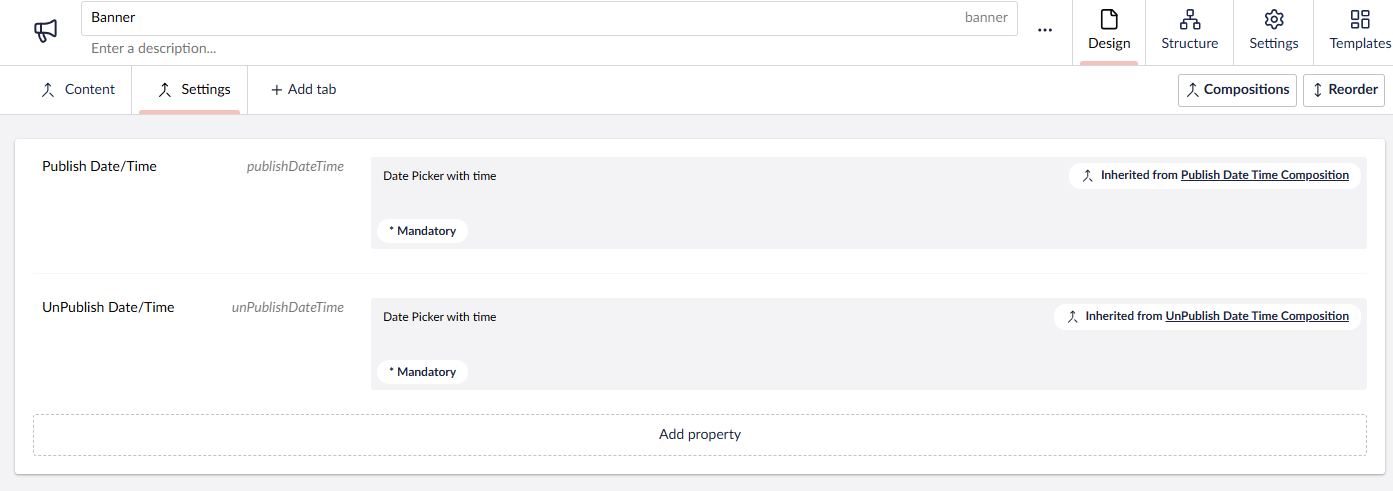
I really like to use compositions on my solution. Not only so I can re-use properties on multiple document types but a composition generates an interface when you use the models builder. So it allows me to easily check if a page model implements a certain interface and I can act on it.
Below the structure for the banner document type where it uses the publish and unpublish compositions.
Index Data
Before you can filter data you need to index the data first. Umbraco samples combine the two I prefer to separate those in a filter and indexer as well. Below the indexer for PublishDate, it does 3 things:
- It set's the default publish date to DateTime.MinValue, this means that when we filter the current date will fall in the published range.
- It converts IContent to IPublishedContent using a helper so we can use Models Builder
- It checks if publishedContent implements the PublishDate Composition and if so sets the publishdate with the publishdate from the property.
UnpublishDate does almost the same, only different fields, composition and uses DateTime.MaxValue by default.
Good to know all content gets indexed, by default with min-date and max-date values so current date/time always falls in the range.
/// <summary>
/// Indexer for publish date, when Icontent is not IPublishDateTimeComposition
/// It will index DateTime.MinValue otherwise selected date.
/// </summary>
public class PublishDateIndexer(IWebsiteHelper _websiteHelper) : IContentIndexHandler
{
    public IEnumerable<IndexFieldValue> GetFieldValues(IContent content, string? culture)
    {
        //Default when there is no publish date defined so it is always less than current date/time
        var publishDate = DateTime.MinValue;

        //Convert IContent to the published version
        var publishedContent = _websiteHelper.GetIPublishedContent(content);
        if (publishedContent is IPublishDateTimeComposition publishDateTimeComposition)
        {
            //Publish date specified use that instead of DateTime.MinValue
            publishDate = publishDateTimeComposition.PublishDateTime;
        }

        return
        [
            new IndexFieldValue
            {
                FieldName = DeliveryAPIConstants.PublishDateFieldName,
                Values = [publishDate]
            }
        ];
    }

    public IEnumerable<IndexField> GetFields() =>
    [
        new()
        {
            FieldName = DeliveryAPIConstants.PublishDateFieldName,
            FieldType = FieldType.Date,
            VariesByCulture = false
        }
    ];
}
Automatically filter the data
So now we want to apply a filter to only retrieve data where the current date/time falls in the indexed publish/unpublish range. As mentioned earlier that you need to apply filters yourself and one is easily forgotten (or removed for some advanced users that can track traffic). So the Architect wanted a solution where we could apply this filter automatically, which makes sense. The only question was how.
After a quick search in the Umbraco source code we saw that every API request was handled by IApiContentQueryService
public interface IApiContentQueryService
{
    /// <summary>
    ///     Returns an attempt with a collection of item ids that passed the search criteria as a paged model.
    /// </summary>
    /// <param name="fetch">Optional fetch query parameter value.</param>
    /// <param name="filters">Optional filter query parameters values.</param>
    /// <param name="sorts">Optional sort query parameters values.</param>
    /// <param name="skip">The amount of items to skip.</param>
    /// <param name="take">The amount of items to take.</param>
    /// <param name="protectedAccess">Defines the limitations for querying protected content.</param>
    /// <returns>A paged model of item ids that are returned after applying the search queries in an attempt.</returns>
    Attempt<PagedModel<Guid>, ApiContentQueryOperationStatus> ExecuteQuery(string? fetch, IEnumerable<string> filters, IEnumerable<string> sorts, ProtectedAccess protectedAccess, int skip, int take)
        => default;
}
Scrutor
My initial thought was to swap the default implementation with a custom one where we add filters automatically in the implementation but the architect pointed to Scrutor what is used to easily decorate existing services. What Scrutor does is taking the original implementation and inject that in your implementation and our implementation can modify parameters before sending them to the original implementation. So in our case we can now add Publish and UnPublish date filters to the FilterOptions list before calling the original provider.
public class ApiContentQueryServiceDecorator(
    IApiContentQueryProvider _decoratedQueryProvider) : IApiContentQueryProvider
{
    public PagedModel<Guid> ExecuteQuery(
        SelectorOption selectorOption,
        IList<FilterOption> filterOptions,
        IList<SortOption> sortOptions,
        string culture,
        ProtectedAccess protectedAccess,
        bool preview,
        int skip,
        int take)
    {
        //Before calling the default implementation add Publish and UnPublish date
        //filters to the filter options list.

        AddPublishDateFilter(filterOptions);
        AddUnPublishDateFilter(filterOptions);

        //Call the default implementation
        return _decoratedQueryProvider.ExecuteQuery(
            selectorOption,
            filterOptions,
            sortOptions,
            culture,
            protectedAccess,
            preview,
            skip,
            take);
    }

    /// <summary>
    /// Create the filter option that we normally create using a querystring parameter
    /// </summary>
    /// <param name="filterOptions">List of filteroptions where we add the publish date filter to</param>
    private void AddPublishDateFilter(IList<FilterOption> filterOptions)
    {
        filterOptions.Add(
            new FilterOption
            {
                FieldName = DeliveryAPIConstants.PublishDateFieldName,
                Values = [DateTime.UtcNow.ToIsoString()],
                Operator = FilterOperation.LessThanOrEqual,
            }
        );
    }

    /// <summary>
    /// Create the filter option that we normally create using a querystring parameter
    /// </summary>
    /// <param name="filterOptions">List of filter options where we add the unpublish date filter to</param>
    private void AddUnPublishDateFilter(IList<FilterOption> filterOptions)
    {
        filterOptions.Add(
            new FilterOption
            {
                FieldName = DeliveryAPIConstants.UnPublishDateFieldName,
                Values = [DateTime.UtcNow.ToIsoString()],
                Operator = FilterOperation.GreaterThanOrEqual,
            }
        );
    }

    /// <summary>
    /// Default implementation
    /// </summary>
    public SelectorOption AllContentSelectorOption() => _decoratedQueryProvider.AllContentSelectorOption();
}
Register the decorator
The last step is to to make sure our ApiContentQueryServiceDecorator is called. Scrutor comes with an Decorate extension to make it easy to decorate an existing service. Add this to your composer and now the ApiContentQueryServiceDecorator is called instead of the default provider.
public class DemoLogicComposer : IComposer
{
    public void Compose(IUmbracoBuilder builder)
    {
        builder.Services.AddSingleton<IWebsiteHelper, WebsiteHelper>();
        //Decorate the default implementation with our ApiContentQueryServiceDecorator
        builder.Services.Decorate<IApiContentQueryProvider, ApiContentQueryServiceDecorator>();
    }
}
End result
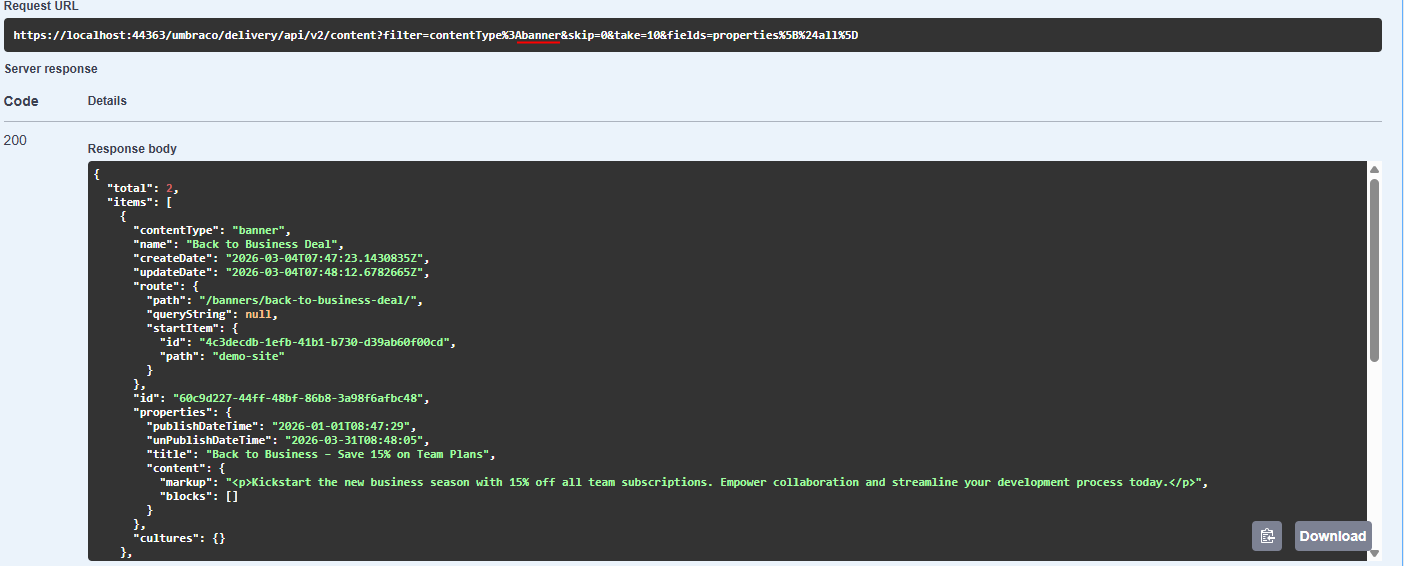
So now when we start the website and request banners via Swagger we only see 2 results instead of the 10 banner items without specifying a publish/unpublish date filters in the query string.
Download source code
I hope you find this useful, besides dates you can of course also index data for specific groups etc when your BFF, Authentication mechanism allows that. Therefore this simple date sample.
Source code for this project can be found on my GitHub page. The project contains a complete solution including SQLite database. Just download and run.
Happy filtering!